
How to Scan & Install Your SIMZY eSIM with a QR Code
In this article
The Arrival Friction: When Physical Setup Holds You Back
You’ve just stepped off a long flight into a busy international arrivals terminal. You’re tired, ready to get to your hotel, and all you want to do is pull up your booking, find your way out of the airport, and confirm your ride.
You take out your phone, but instead of connecting, it sits on one bar before dropping to “No Service.”
Suddenly, a straightforward arrival becomes stressful. You’re left deciding between waiting in line at an airport SIM kiosk or using public Wi-Fi and hoping your personal information stays safe. When you rely on your phone for banking, bookings, messages, and directions, neither option is particularly appealing.
Then there’s the physical SIM hassle. Trying to swap a tiny card with a paperclip in a crowded airport can easily result in a lost SIM or ejector pin. Worse, removing your home SIM can disconnect your regular number and make it harder to receive important two-factor authentication (2FA) codes from your bank.
Add restrictive carrier plans, unexpected roaming charges, and unreliable coverage, and staying connected abroad can become a headache at exactly the wrong time.
After a long journey, the last thing you should have to worry about is finding a signal. You should be able to land, connect, and get on with your trip.
Facts & Reality Check: Why Traditional Roaming Can Be a Problem
Traditional roaming can make international travel more complicated and expensive than it needs to be. Depending on your carrier and plan, you may face daily roaming charges, data limits, or unexpected fees that are difficult to keep track of while you’re abroad.
Trying to avoid those costs by buying a local physical SIM comes with its own challenges.
Physical SIMs require manual handling, a SIM tray, and somewhere safe to store your original card. Once you remove your home SIM, you may lose access to your regular number, which can affect calls, messages, work notifications, and important banking verification texts.
Buying a SIM after landing can also mean finding a retailer, waiting in line, completing registration, and dealing with unfamiliar processes. If you’re visiting several countries, repeating the same process at every destination quickly becomes tiring.
For travellers moving between European cities, exploring Asia-Pacific destinations, or taking a road trip across North America, a digital eSIM can offer a much simpler way to stay connected.
The SIMZY Solution: Step-by-Step Guide to QR Code Installation
SIMZY replaces the physical SIM card with a digital eSIM that you can install directly on a compatible smartphone.
Whether you’re a digital nomad, remote worker, student, business traveller, or simply heading away for a holiday, SIMZY offers data plans across 220+ destinations, including regional options covering Europe, Asia-Pacific, North America, and global destinations.
Choose a Plan That Fits Your Trip
1. Daily Pass: A convenient option for short city breaks, weekend trips, layovers, and stopovers.
Nomad Plans: Designed for longer trips, multi-month travel, and travellers visiting several destinations.
Smart Business Solutions: Suitable for remote professionals, business travellers, and teams that need mobile data while working abroad.
You can also use features such as Buy Now, Schedule Later to prepare your eSIM before departure and schedule when you want it to activate. Multi-currency payment options can make purchasing easier when travelling internationally, while group travel tools allow multiple lines to be managed from one account.
How to Install Your SIMZY eSIM
Getting your eSIM ready takes just three simple steps:
1. Check compatibility
Make sure your smartphone supports eSIM technology. You can check your phone’s settings or use the SIMZY app to confirm compatibility.
2. Choose your plan
Select the country-specific or regional plan that matches your itinerary. Review the plan details and pricing before completing your purchase.
3. Scan the QR code and activate
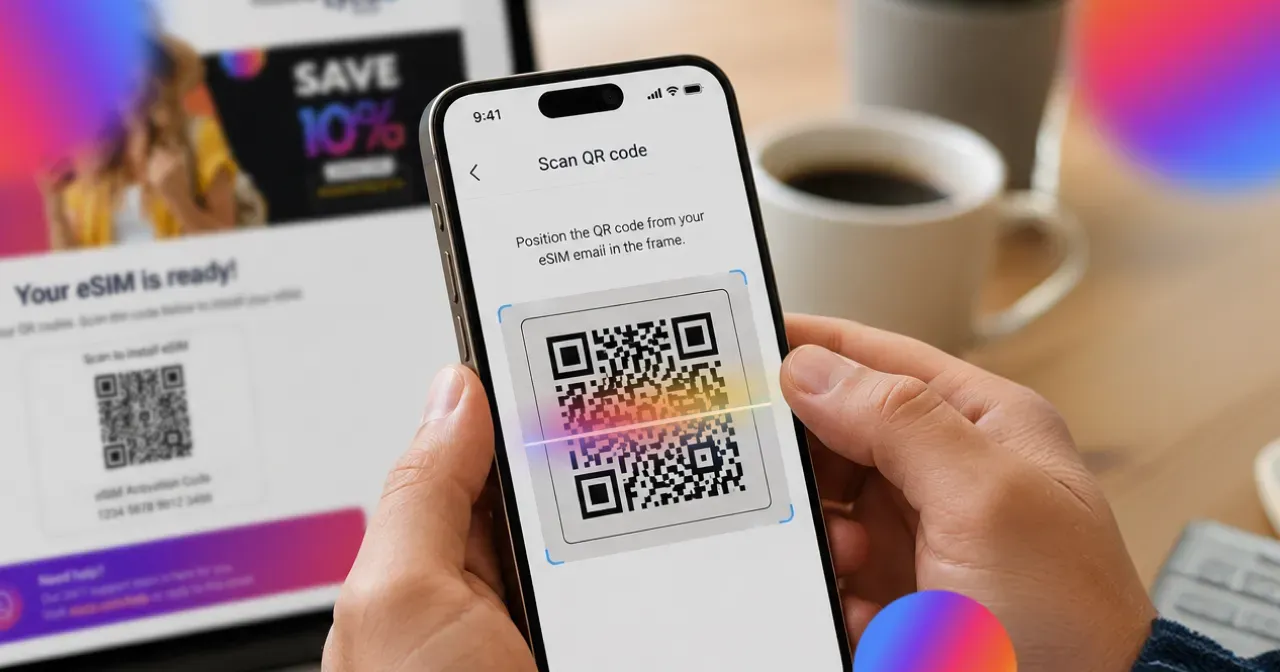
Your unique QR code is sent to your email and available through your SIMZY app profile. Depending on your phone, you can scan the QR code using your camera or through your device’s cellular settings. You can display the code on another screen or use a printed copy, then follow the on-screen instructions to install the eSIM.
If your phone supports Dual SIM, you can keep your regular home line active for calls and important 2FA messages while using SIMZY for mobile data.
And if you run into any problems during setup, SIMZY offers 24/7 customer support through the app.
Traditional Roaming vs. Instant eSIM: Key Differences
1. Setup: Traditional SIMs can require an airport kiosk visit, registration, and manual card installation. With SIMZY, you can complete the setup digitally before you travel.
2. Access to your regular number: Removing your home SIM can interrupt access to your usual number and important 2FA messages. With Dual SIM on compatible devices, you can keep your primary line active while using SIMZY for data.
3. Activation: A physical SIM may require you to spend time looking for a local retailer after landing. With SIMZY, you can install the eSIM before your trip and activate it when you’re ready to connect.
4. Hardware: Physical SIMs require a card and sometimes an ejector pin, both of which can be easy to lose. An eSIM is installed digitally, so there’s no physical card to carry or swap.
5. Travelling between countries: Traditional SIMs may require you to buy and change cards at each destination. A suitable regional eSIM plan can cover multiple countries without requiring physical SIM swaps.
Practical Tips for a Smoother QR Code Setup
A little preparation before your flight can make the arrival process much easier.
1. Keep your primary line available for 2FA: If your phone supports Dual SIM, keep your home number active for important calls and security messages while using SIMZY as your mobile data line.
2. Download maps before you leave: Save offline areas in Google Maps while connected to trusted Wi-Fi. This gives you directions even if your connection is temporarily unreliable after landing.
3. Arrange your ride before leaving the airport: Activate your SIMZY profile before landing so you can use ride-hailing apps such as Uber as soon as you reach the arrivals area, without having to search for airport Wi-Fi.
4. Save large updates for Wi-Fi: Keep your travel data available for navigation, messages, and other essentials by setting large system updates, cloud backups, and app downloads to run over trusted Wi-Fi.
Borderless Connection Made Simple
Installing an eSIM doesn’t have to be complicated. With a QR code and a compatible phone, you can set up your SIMZY connection before your trip and avoid the hassle of finding a physical SIM after landing.
No tiny SIM card to keep track of. No ejector pin to lose. And no need to spend your first hour in a new country standing in line at an airport kiosk.
Set up your SIMZY eSIM before you travel, land with your connection ready, and get on with your trip.
Keep reading

Best eSIM for Japan in 2026: Stay Online from Narita to Kyoto
Find the best eSIM for Japan in 2026. Compare data plans, coverage, prices and setup tips to stay connected from Narita to Kyoto with SIMZY.
What is an EID number and how do you find it?
Learn what an EID number is, where to find it on iPhone and Android, and how it helps activate an eSIM. Get connected with a SIMZY eSIM today.

Will You Be Impacted by the Turkey eSIM Block? What Travelers Should Know
Is there an eSIM ban in Turkey? Learn about Turkey's eSIM restrictions, what they mean for travelers, and how to stay connected during your trip.