
What is an EID number and how do you find it?
In this article
Organizing overseas travel experience involves finalizing your airfare, packing your luggage, and making sure that you are fully able to use mobile data. Some digital travel applications, such as SIMZY, will require you to enter a 32-digit numeric code when you are setting them up. This 32-digit code is known as the EID number.
You need to be aware of what the EID number is so you can find it on your phone swiftly whenever required.
What is EID Number?
The term EID stands for 'Embedded Identity Document'. This 32-digit code is given permanently to the eSIM chip that is built into mobile devices, such as mobile phones, tablets, or smartwatches.
An EID number (for Embedded Identity Document) is an exclusive number with 32 digits that is assigned permanently to the embedded eSIM chip located inside your mobile, tablet, and smartwatch. Consider your phone as an electronic house.
IMEI (International Mobile Equipment Identity) is the identifier for your house. EID marks the identifier of the electronic lock within the house.
ICCID (the SIM profile number) acts as the key that is stored in the electronic lock. Since eSIM is fixed to the motherboard of your phone, the EID is regarded as the electronic fingerprint of the eSIM device's internal hardware.
When the travel data plan is activated, the EID is used for the transmission of the downloadable profile via the Wi-Fi connection.
EID vs. IMEI vs. ICCID: Quick Comparison
Identifier | Length | What It Identifies | Does It Change? |
EID | 32 Digits | The embedded eSIM hardware chip (eUICC) | Permanent |
IMEI | 15 Digits | Physical phone hardware | Permanent |
ICCID | 19–20 Digits | A specific SIM or eSIM network plan profile | Changes per plan |
How to Find Your EID Number on Any Device
Finding your EID won't take much time. The process varies based on the operating system of your phone:
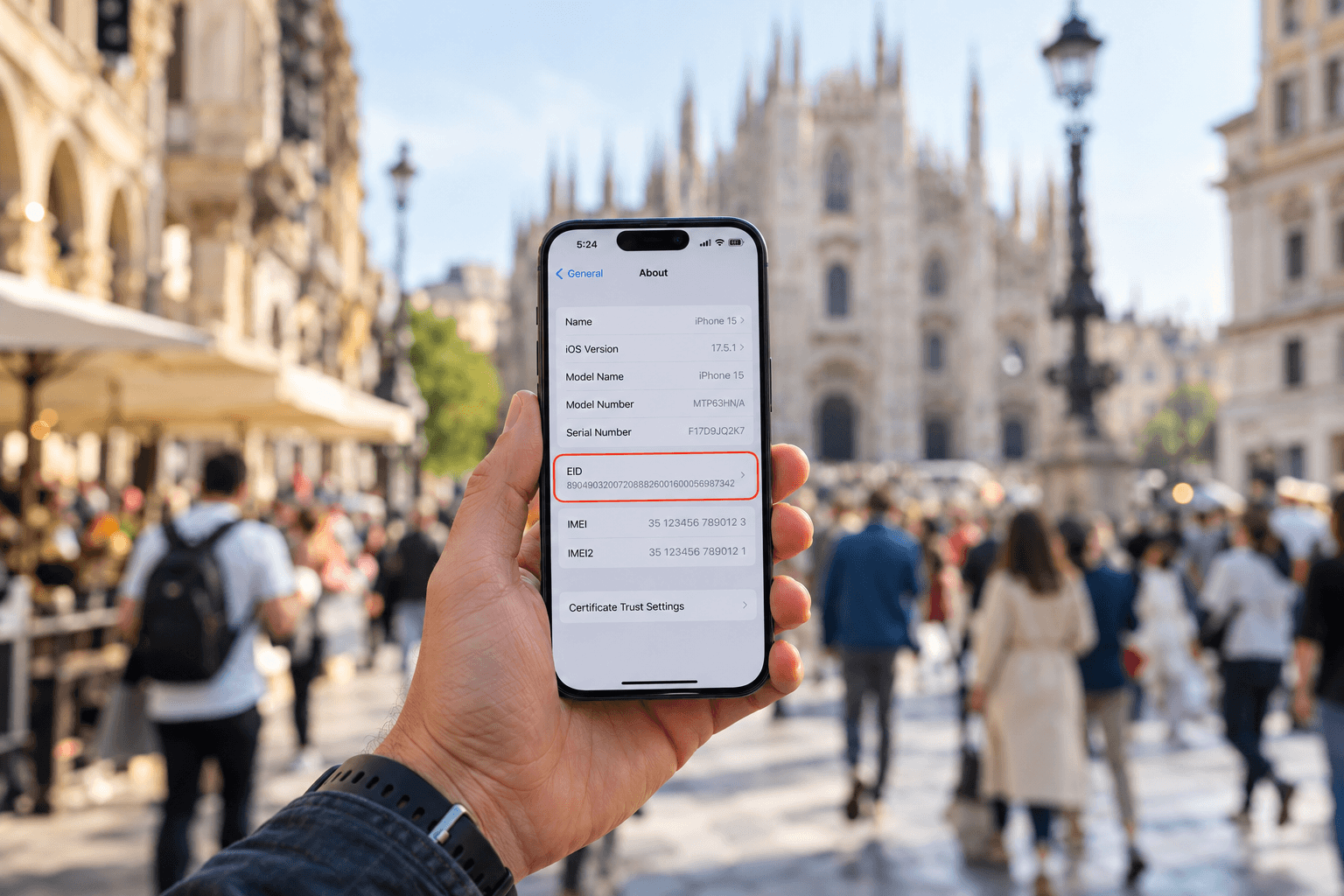
1. Locating EID on iPhone (iOS)
You must start by launching the Settings app on the device.
Next, go to General and tap on About.
Scroll to the EID section.
2. Finding EID on Android (Samsung, Google Pixel, Motorola)
In the case of Google Pixel and stock Android devices, go to Settings, click on About phone, and scroll to find SIM status or EID.
On Samsung Galaxy devices, simply go to Settings, tap on About phone, and choose Status information to look for EID.
Universal Android Method: You can use your phone app and type *06#. This will open a screen with all the device's information, including IMEI, Serial Number, and the EID barcode.
3. Check the Original Retail Packaging
In case your device isn’t turned on or if you're in the process of activating another device, you can easily find EID information on your phone's retail box, where it is written next to IMEI on the barcode sticker.
Importance of EID for Travel
You typically need not worry about remembering your EID in your day-to-day internet usage. However, it is extremely useful for certain international travel purposes:
Instant eSIM Compatibility Verification: If an EID is present in your phone's settings, it means that your phone has the hardware eSIM capacity. If your carrier provides EID in the settings, it means that you can utilise the SIMZY application without any issues.
Manual Carrier Activation: While most travellers use a QR code to activate their eSIM on SIMZY, enterprise customers can use EID to manually activate their plans on the network without delay.
Quick Technical Assistance: Should you experience issues activating your phone while on a trip, having the EID on hand will enable customer service representatives to quickly resolve any issues with the eSIM chip in your phone.
Travel Smarter with SIMZY
When you have confirmed that your phone has an EID, it’s time to prepare for smooth international travel data. SIMZY makes this process easy by offering you options between single-country passes and comprehensive regional packages, covering more than 220 countries around the world! Start arranging your plan in advance, make your purchase from your sofa, scan your QR code over your internet connection, and activate the plan on the day of travel.
Keep reading

Best eSIM for Mexico: Plans, Prices & Coverage | SIMZY
Best eSIM for Mexico with SIMZY. Compare data plans, explore Mexico, the USA and Canada, and enjoy easy activation with reliable 4G/5G connectivity.

Will You Be Impacted by the Turkey eSIM Block? What Travelers Should Know
Is there an eSIM ban in Turkey? Learn about Turkey's eSIM restrictions, what they mean for travelers, and how to stay connected during your trip.

The Best Travel eSIM for Spain: The 2026 Guide for Travelers
Looking for the best travel eSIM for Spain? Compare data plans, coverage, prices and setup tips, then choose a SIMZY Spain eSIM for your 2026 trip.